> ## Documentation Index
> Fetch the complete documentation index at: https://densify-sync-changelog-3.mintlify.site/llms.txt
> Use this file to discover all available pages before exploring further.
# FAQs
This topic provides the answers to frequently asked questions.
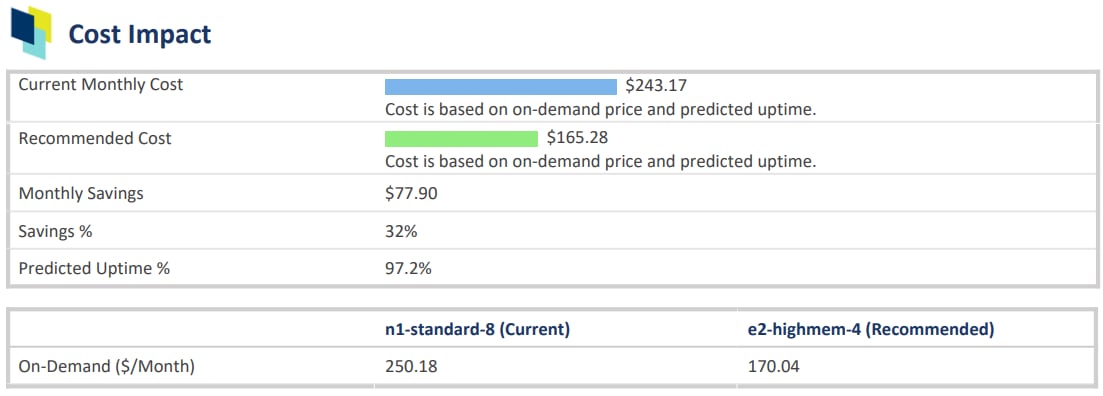
In the Impact Analysis and Recommendation Report report > Cost Impact section, monthly savings are determined based on the current cost of the instance and the cost of the instance type that Kubex is recommending.
The current cost is calculated based on the current, monthly on-demand catalog price for the instance in the specified region multiplied by the predicted uptime %:
```
current per-instance list price (monthly)* predicted uptime %
```
Consider the following:
* Discounts from Savings Plans, RIs or reservations are not considered in this calculation.
* The cost is based on the monthly cost of the instance type, not hourly.
* The predicted uptime (%) for a cloud instance or container, is based on the percentage of hours CPU utilization data is present in the historical interval, as specified in the policy settings for the entity. For Auto Scaling groups and VM Scale Sets and Individual child instances are not taken into account.
Predicted uptime %, for new instances or containers, that started mid-way through the historical interval, is calculated from the time/date that the instance was started as opposed to the beginning of the interval, resulting in more accurate predictions for future usage.
For example, the uptime is the number of hours that have "CPU Utilization in mcores", and the range is the lesser of when the container was discovered, or the range defined in the policy. Looking at a specific container that was discovered on Jan 5th 2024, that has workload of 42 hours since that date, then the uptime % is 42 hrs/(13 days x 24 hrs/day) = 13.4%. This is the value shown in this column.
For example: ($250.18 * 97.2% = $243.18) - ($170.04 * 97.2% = $165.27) = \$77.90 in savings
* Predicted uptime % is not used in the API, when calculating `savingsEstimate`. See the example below.
Figure: Monthly Catalog Cost for Current Instance Type
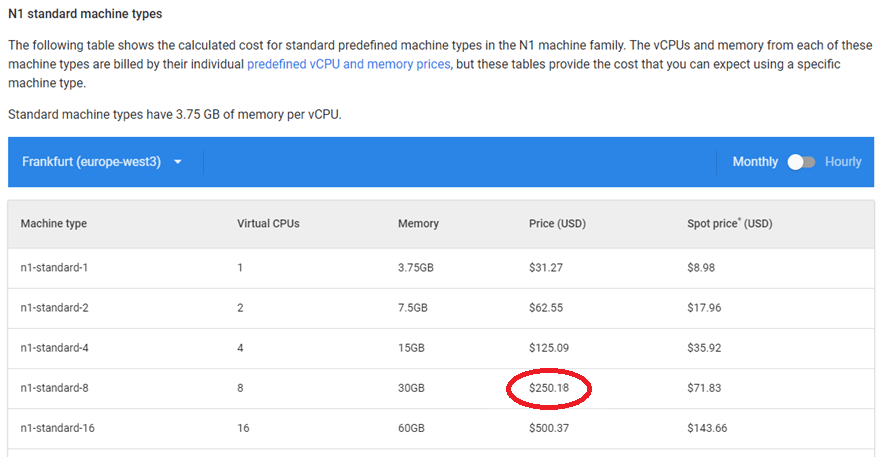 Figure: Monthly Catalog Cost for Recommended Instance Type
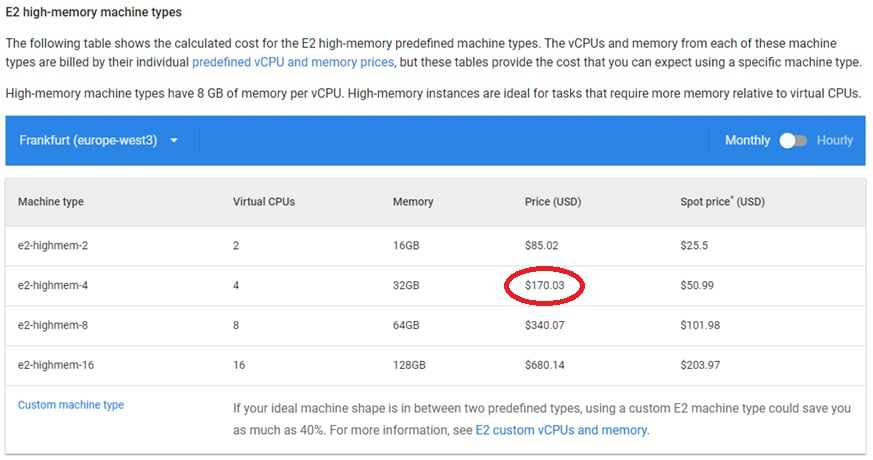 Figure: Densify's Impact Analysis and Recommendation Report
 See [Understanding the Instance Optimization Details Report](../Densify_Com/Understanding_the_Instance_Details_Report).
When you are using the Kubex API the the predicted uptime % is not used when determining the value of savingestimate.
In this case the current cost is calculated based on the current, monthly on-demand catalog price for the instance in the specified region:
```
current per-instance list price (monthly)* hrs in the month
```
Consider the following:
* Discounts from Savings Plans, RIs or reservations are not considered in this calculation.
* The cost is based on the monthly cost of the instance type, not hourly.
* Predicted uptime % is not used in the API, when calculating `savingsEstimate`.
In this example, we will use an R5a.8xlarge instance running in US-East1:
Figure: Catalog Cost for Current Instance Type - Hourly Rate
See [Understanding the Instance Optimization Details Report](../Densify_Com/Understanding_the_Instance_Details_Report).
When you are using the Kubex API the the predicted uptime % is not used when determining the value of savingestimate.
In this case the current cost is calculated based on the current, monthly on-demand catalog price for the instance in the specified region:
```
current per-instance list price (monthly)* hrs in the month
```
Consider the following:
* Discounts from Savings Plans, RIs or reservations are not considered in this calculation.
* The cost is based on the monthly cost of the instance type, not hourly.
* Predicted uptime % is not used in the API, when calculating `savingsEstimate`.
In this example, we will use an R5a.8xlarge instance running in US-East1:
Figure: Catalog Cost for Current Instance Type - Hourly Rate
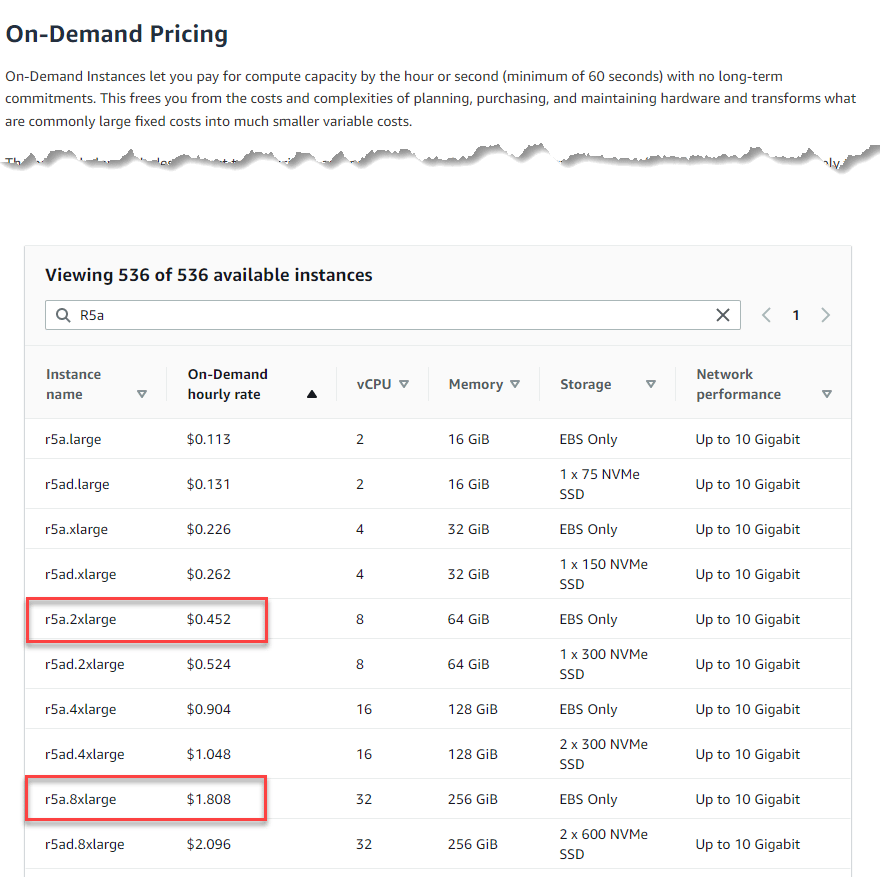 1. Number of hrs per month is (365 days/yr \*24 hrs/day)/12 months/yr) = 730 hrs/month
2. Current cost: $1.808/hr *30 hrs/month=$1,319.84/month
3. The recommended instance is r5a.2xlarge: $0.452 *730=$329.96/month
4. Total savings would be: current cost - recommended cot = \$989.88 (75%)
The value of savingestimate output parameter is the difference between the current and recommended instance type cost (this is the catalog cost). When using the API, the predicted uptime is NOT taken into consideration (i.e. \[[FAQs](#_cost) – [FAQs](#_recommendedCost)]). The Impact Analysis and Recommendation Report report uses the predicted uptime % when calculating estimated savings regardless of whether the report is obtained through the UI or via API.
You can download the Impact Analysis and Recommendation Report using the the `rptHref` resource. Refer to the API documentation for details.
In cases where memory utilization data is not collected you have 3 options:
* Enable the collection of memory metrics.
* AWS--Enable a CloudWatch agent to collect memory. There is an extra cost for each metric. Once enabled, Kubex will collect the data automatically. See [AWS Data Collection Using a CloudFormation Template](../Data_Collection_for_Public_Cloud_Systems/AWS_Data_Collection_Using_a_CloudFormation_Template#Enabling_Memory_Metrics).
* Azure provides memory data and the Azure data collection modules collect the available memory data.
* GCP--Install the Ops agent on each instance to retrieve memory. See [Collecting GCP Memory Metrics](../Data_Collection_for_Public_Cloud_Systems/Google_Cloud_Platform_Data_Collection_Prerequisites#GCP_Memory_Metrics).
* Import collected memory data from a third-party tool, such as Prometheus, Splunk or SignalFX. The Kubex services team can provide details of an integration for Datadog.
* Backfill missing memory by enabling the corresponding policy settings. This is not the preferred option but is the easiest to implement if memory utilization metrics are not being collected.
See [Public Cloud Memory Metrics](../Data_Collection_for_Public_Cloud_Systems/Public_Cloud_Memory_Metrics) for details and examples.
It is possible to move to the optimal instance type but depending on the type of instances involved, your current instance type may have to be stopped and then resized. It is possible that one or both of the following issues are the likely cause of the unsuccessful recommendation deployment attempts:
1. It is noted in the Microsoft documentation [Resize a virtual machine - Azure Virtual Machines | Microsoft Docs](https://docs.microsoft.com/en-us/azure/virtual-machines/resize-vm?tabs=portal). that if your VM is still running and you do not see the desired size in the list, then stopping your VM instance may reveal more sizes. It is a known issue when working with some instance types.
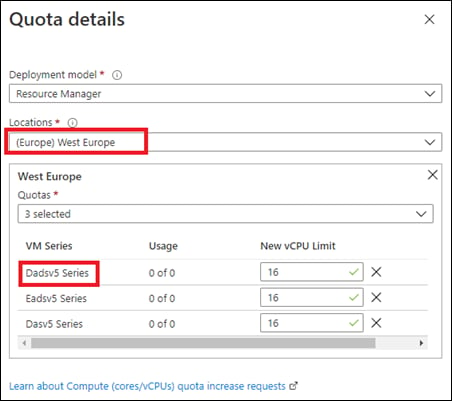
2. There needs to be a sufficient family vCPUs quota for the relevant families as explained here: [https://docs.microsoft.com/en-us/azure/azure-portal/supportability/per-vm-quota-requests](https://docs.microsoft.com/en-us/azure/azure-portal/supportability/per-vm-quota-requests). This requires a support request to Microsoft. You only need to do this once per subscription and you can add multiple families at one time.
Figure: Azure Support Request
1. Number of hrs per month is (365 days/yr \*24 hrs/day)/12 months/yr) = 730 hrs/month
2. Current cost: $1.808/hr *30 hrs/month=$1,319.84/month
3. The recommended instance is r5a.2xlarge: $0.452 *730=$329.96/month
4. Total savings would be: current cost - recommended cot = \$989.88 (75%)
The value of savingestimate output parameter is the difference between the current and recommended instance type cost (this is the catalog cost). When using the API, the predicted uptime is NOT taken into consideration (i.e. \[[FAQs](#_cost) – [FAQs](#_recommendedCost)]). The Impact Analysis and Recommendation Report report uses the predicted uptime % when calculating estimated savings regardless of whether the report is obtained through the UI or via API.
You can download the Impact Analysis and Recommendation Report using the the `rptHref` resource. Refer to the API documentation for details.
In cases where memory utilization data is not collected you have 3 options:
* Enable the collection of memory metrics.
* AWS--Enable a CloudWatch agent to collect memory. There is an extra cost for each metric. Once enabled, Kubex will collect the data automatically. See [AWS Data Collection Using a CloudFormation Template](../Data_Collection_for_Public_Cloud_Systems/AWS_Data_Collection_Using_a_CloudFormation_Template#Enabling_Memory_Metrics).
* Azure provides memory data and the Azure data collection modules collect the available memory data.
* GCP--Install the Ops agent on each instance to retrieve memory. See [Collecting GCP Memory Metrics](../Data_Collection_for_Public_Cloud_Systems/Google_Cloud_Platform_Data_Collection_Prerequisites#GCP_Memory_Metrics).
* Import collected memory data from a third-party tool, such as Prometheus, Splunk or SignalFX. The Kubex services team can provide details of an integration for Datadog.
* Backfill missing memory by enabling the corresponding policy settings. This is not the preferred option but is the easiest to implement if memory utilization metrics are not being collected.
See [Public Cloud Memory Metrics](../Data_Collection_for_Public_Cloud_Systems/Public_Cloud_Memory_Metrics) for details and examples.
It is possible to move to the optimal instance type but depending on the type of instances involved, your current instance type may have to be stopped and then resized. It is possible that one or both of the following issues are the likely cause of the unsuccessful recommendation deployment attempts:
1. It is noted in the Microsoft documentation [Resize a virtual machine - Azure Virtual Machines | Microsoft Docs](https://docs.microsoft.com/en-us/azure/virtual-machines/resize-vm?tabs=portal). that if your VM is still running and you do not see the desired size in the list, then stopping your VM instance may reveal more sizes. It is a known issue when working with some instance types.
2. There needs to be a sufficient family vCPUs quota for the relevant families as explained here: [https://docs.microsoft.com/en-us/azure/azure-portal/supportability/per-vm-quota-requests](https://docs.microsoft.com/en-us/azure/azure-portal/supportability/per-vm-quota-requests). This requires a support request to Microsoft. You only need to do this once per subscription and you can add multiple families at one time.
Figure: Azure Support Request
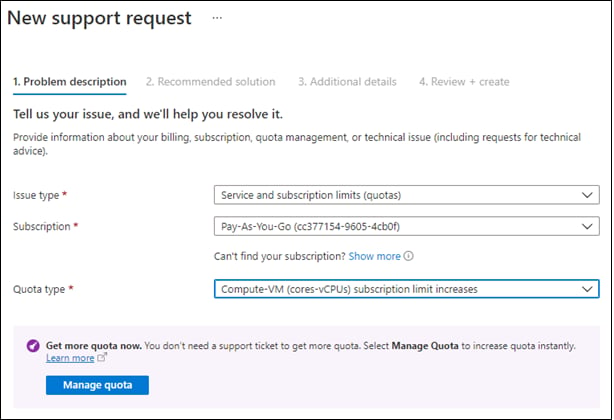 Figure: Azure Support Request - Specify Quota Details