
> ## Documentation Index
> Fetch the complete documentation index at: https://densify-sync-changelog-3.mintlify.site/llms.txt
> Use this file to discover all available pages before exploring further.

# Using the Catalog Map

export const InlineImage = ({src, href, alt = "", size = "medium", customSize, position = "left", children}) => {
  const sizeClasses = {
    small: "w-6 h-6",
    medium: "w-8 h-8",
    large: "w-12 h-12",
    xlarge: "w-16 h-16"
  };
  const ImageComponent = () => <img src={src} alt={alt} className={customSize ? '' : sizeClasses[size]} style={{
    verticalAlign: 'baseline',
    display: 'inline-block',
    margin: '0',
    padding: '0',
    border: 'none',
    maxHeight: '1em',
    ...customSize ? {
      width: customSize,
      height: customSize
    } : {}
  }} />;
  const imageElement = href ? <a href={href} className="inline-block border-b-0 no-underline">
            <ImageComponent />
        </a> : <ImageComponent />;
  return <>
            {position === "left" && imageElement}
            {position === "left" && " "}
            {children}
            {position === "right" && " "}
            {position === "right" && imageElement}
        </>;
};

## Overview

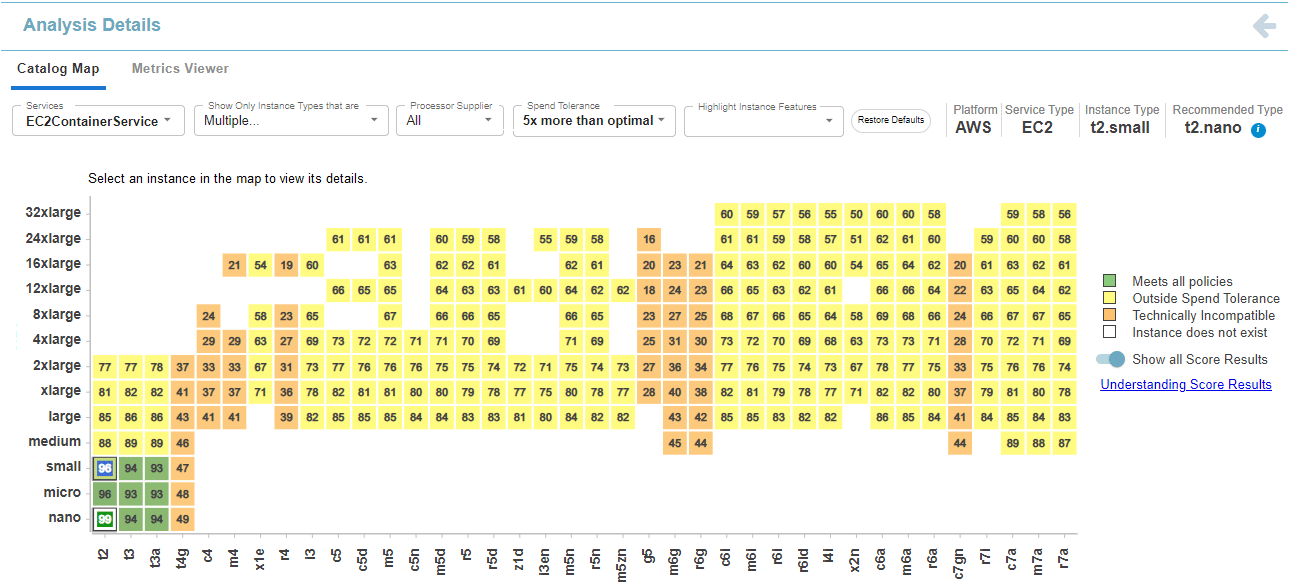
The Kubex catalog map allows you to view a range of recommended instance type options. The map view shows the AWS or Azure catalog scored for your selected workload using Densify's analytics. Filters allow you to limit the catalog based on items such as processor type, processor features and instance cost.

<Accordion title="Video: Using the Catalog Map">
  <iframe allowfullscreen="allowfullscreen" class="vidyard_iframe" frameborder="0" height="360" mozallowfullscreen="mozallowfullscreen" msallowfullscreen="msallowfullscreen" oallowfullscreen="oallowfullscreen" src="https://player.vimeo.com/video/939643302" webkitallowfullscreen="webkitallowfullscreen" width="630" />
</Accordion>

When used with the corresponding API endpoint, you can automate the selection of the best instance types for your workloads. See [Systems: Analysis Details](/docs-api/WebHelp_Densify_API_Cloud/Content/API_Guide/Systems_Analysis_Details).

<Note>
  The catalog map is not currently available for AWS ASGs, VM Scale Sets with Max Size ≥ 1 or GCP cloud instances.
</Note>

### Page Navigation

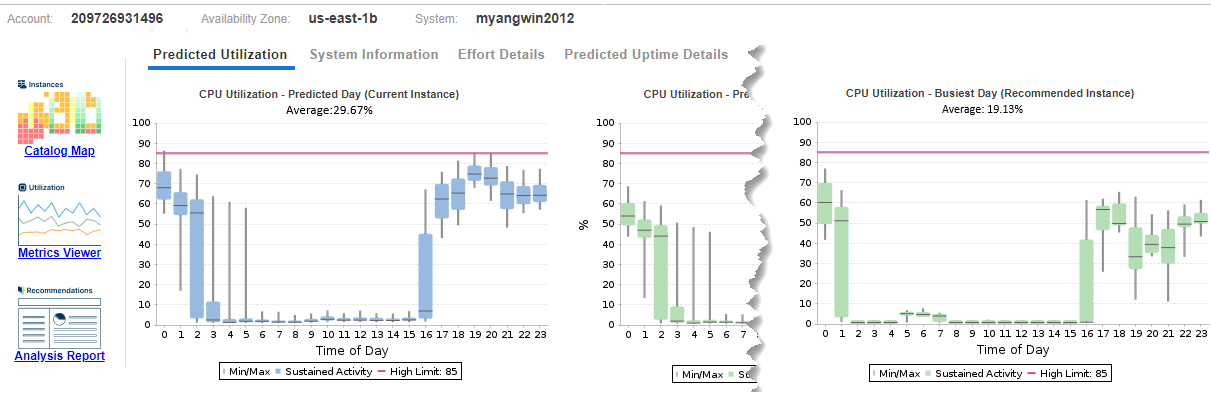
Access the catalog map from the [Instance Optimization Details](./Understanding_the_Instance_Details_Report) page for AWS and Azure cloud instance details.

<Accordion title="Figure: Accessing the Catalog Map (hover over image to expand)">
  <Frame>
    <img src="https://mintcdn.com/densify-sync-changelog-3/Hjtc4f8VVVcXT_vY/images/docs/WebHelp_Densify_Cloud/Content/Resources/Images/Cirba_SaaS/06000128.png?fit=max&auto=format&n=Hjtc4f8VVVcXT_vY&q=85&s=b96d7b6f76a22aaf1155df32a6faa1b7" alt="" width="1211" height="395" data-path="images/docs/WebHelp_Densify_Cloud/Content/Resources/Images/Cirba_SaaS/06000128.png" />
  </Frame>
</Accordion>

Clicking the hyperlink opens the catalog map showing the selected instance. The page opens with either the default or saved filter settings, if you are within the same session.

<Accordion title="Figure: Catalog Map (hover over image to expand)">
  <Frame>
    <img src="https://mintcdn.com/densify-sync-changelog-3/Hjtc4f8VVVcXT_vY/images/docs/WebHelp_Densify_Cloud/Content/Resources/Images/Cirba_SaaS/06000138.png?fit=max&auto=format&n=Hjtc4f8VVVcXT_vY&q=85&s=843244b6e3aa4e3c94b5d7852a83de5e" alt="" width="1291" height="586" data-path="images/docs/WebHelp_Densify_Cloud/Content/Resources/Images/Cirba_SaaS/06000138.png" />
  </Frame>
</Accordion>

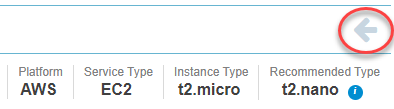
Use the back button in the top-right corner of the page to return to the parent Instance Optimization Details page. Do not use the browser's back button for navigation within Kubex as this exits Densify.

<Accordion title="Figure: Back Button (hover over image to expand)">
  <Frame>
    <img src="https://mintcdn.com/densify-sync-changelog-3/Hjtc4f8VVVcXT_vY/images/docs/WebHelp_Densify_Cloud/Content/Resources/Images/Cirba_SaaS/06000130.png?fit=max&auto=format&n=Hjtc4f8VVVcXT_vY&q=85&s=fc5e5ffff785cccc16ad05c43b605ae4" alt="" width="394" height="109" data-path="images/docs/WebHelp_Densify_Cloud/Content/Resources/Images/Cirba_SaaS/06000130.png" />
  </Frame>
</Accordion>

### Catalog Map Controls

When you select an instance on the Instance Optimization Details page, the catalog map is populated with the analysis results for that selected instance. You can select another service using the Services dropdown or return to the Instance Optimization Details page.

When you open the catalog map, the instance that was selected in the Instance Optimization Details page, is displayed. The cloud provider's catalog options and the available instance sizes and their scores for the selected workload comprise the catalog map

You can configure what data you want to view for this instance using the controls at the top of the page.

<Accordion title="Figure: Catalog Map Controls (hover over image to expand)">
  <Frame>
    <img src="https://mintcdn.com/densify-sync-changelog-3/Hjtc4f8VVVcXT_vY/images/docs/WebHelp_Densify_Cloud/Content/Resources/Images/Cirba_SaaS/06000140.png?fit=max&auto=format&n=Hjtc4f8VVVcXT_vY&q=85&s=3cee051b88db97fc891e97c06176c2b9" alt="" width="938" height="46" data-path="images/docs/WebHelp_Densify_Cloud/Content/Resources/Images/Cirba_SaaS/06000140.png" />
  </Frame>
</Accordion>

Use the following options to configure this report:

<Accordion title="Table: Catalog Map Controls">
  <table class="table_1">
    <thead>
      <tr>
        <th class="td_2">
          <p class="CiRBATableColumnText">Setting </p>
        </th>

        <th class="td_2">
          <p class="CiRBATableColumnText">Default </p>
        </th>

        <th class="td_2">
          <p class="CiRBATableColumnText">Description</p>
        </th>
      </tr>
    </thead>

    <tbody>
      <tr>
        <td class="td_3">
          <p class="CiRBATableText">Services</p>
        </td>

        <td class="td_3">
          <p class="CiRBATableText">Last selected instance from the <span class="mc-variable Document.Instance_Optimization_Details variable">Instance Optimization Details</span></p>
        </td>

        <td class="td_3">
          <p class="CiRBATableText">This dropdown list is populated with the instances from the <span class="mc-variable Document.Instance_Optimization_Details variable">Instance Optimization Details</span> page from where the <span class="mc-variable Document.heat_map variable">catalog map</span> was opened. i.e. all of the services displayed in the tabular report, are available here.</p>
          <p class="CiRBATableText">Services in this list are named using the convention \<service name>\<system-id>. The selected instance is at the top of the list and the rest are listed in alphabetical order. The first 30 characters of the name are displayed and the entire string is displayed if you hover over the <span class="CiRBAcharUIElement">Services</span> list.</p>

          <p class="CiRBATableText">
            <Frame>
              <img src="https://mintcdn.com/densify-sync-changelog-3/Hjtc4f8VVVcXT_vY/images/docs/WebHelp_Densify_Cloud/Content/Resources/Images/Cirba_SaaS/06000144_275x51.png?fit=max&auto=format&n=Hjtc4f8VVVcXT_vY&q=85&s=54078064aba40c45b7c4ca3b29765bc7" width="275" height="51" data-path="images/docs/WebHelp_Densify_Cloud/Content/Resources/Images/Cirba_SaaS/06000144_275x51.png" />
            </Frame>
          </p>

          <p class="CiRBATableText">You can select one service to review in the <span class="mc-variable Document.heat_map variable">catalog map</span>.</p>
          <p class="CiRBATableText">To search for a specific instance enter the name of the instance, as you type, matching strings are displayed in the list. You can also paste a string into this field and if a match exists, it is displayed. </p>
          <p class="CiRBATableText">Only the services from the parent <span class="mc-variable Document.Instance_Optimization_Details variable">Instance Optimization Details</span> page are searched.</p>
        </td>
      </tr>

      <tr>
        <td class="td_3">
          <p class="CiRBATableText">Show Only Instance Types that are:</p>
        </td>

        <td class="td_3">
          <p class="CiRBATableText">Commonly used options, that are available in the selected region are shown as a comma-separated list</p>
        </td>

        <td class="td_3">
          <p class="CiRBATableText">Select one or more of the following options to filter the list of instance types to be displayed in the <span class="mc-variable Document.heat_map variable">catalog map</span>.</p>

          <ul class="ul_1">
            <li class="CiRBATableBullet">Commonly used—Instances that are used by less than 0.5% of <span class="mc-variable General.ProductName variable">Densify</span> customers are considered to be NOT commonly used. These "exotic" instances are not included in the chart, unless the "Commonly Used" option is deselected.</li>
            <li class="CiRBATableBullet">Available in the current region—Instance types available in the same region as the selected service. </li>
            <li class="CiRBATableBullet">Meeting all policies—Instance types that comply with all policy settings that have been defined for  the selected service. </li>
          </ul>
        </td>
      </tr>

      <tr>
        <td class="td_3">
          <p class="CiRBATableText">Processor Supplier</p>
        </td>

        <td class="td_3">
          <p class="CiRBATableText">All</p>
        </td>

        <td class="td_3">
          <p class="CiRBATableText">Select one or more of the following options to filter the list of instance types to be displayed in the <span class="mc-variable Document.heat_map variable">catalog map</span>.</p>

          <ul class="ul_1">
            <li class="CiRBATableBullet">Intel</li>
            <li class="CiRBATableBullet">AMD</li>
            <li class="CiRBATableBullet">ARM</li>
          </ul>
        </td>
      </tr>

      <tr>
        <td class="td_3">
          <p class="CiRBATableText">Spend Tolerance</p>
        </td>

        <td class="td_3">
          <p class="CiRBATableText">5x more than optimal</p>
        </td>

        <td class="td_3">
          <p class="CiRBATableText">Specify a spend tolerance value that determines cost compatibility. For example, selecting a value of 20% means that instance types that cost up to 20% more than the optimal instance type are considered compatible. You can choose a spend tolerance ranging from the exact cost of the optimal instance (No more than optimal) to no cost limit (Unlimited).</p>
          <p class="CiRBATableText">Spend tolerance impacts the compatibility status of instance types that are technically compatible based on resource requirements. If an instance exceeds the specified spend tolerance, it will be shown in yellow to indicate it is technically compatible but not cost-efficient. As you increase the spend tolerance, more instance types will be within the acceptable range and change from yellow to green, indicating both technical and cost compatibility.</p>
        </td>
      </tr>

      <tr>
        <td class="td_3">
          <p class="CiRBATableText">Highlight Instance Features</p>
        </td>

        <td class="td_3">
          <p> </p>
        </td>

        <td class="td_3">
          <p class="CiRBATableText">Select one or more instance features that may improve the performance of your workload. Values displayed in this dropdown are based on the selected region and cloud provider.</p>
          <p class="CiRBATableText">Selections are shown in the dropdown window as comma-separated values. </p>
          <p class="CiRBATableText">Instance types with the selected features are not highlighted for services with a terminate recommendation.</p>
        </td>
      </tr>

      <tr>
        <td class="td_3">
          <Frame>
            <img src="https://mintcdn.com/densify-sync-changelog-3/Hjtc4f8VVVcXT_vY/images/docs/WebHelp_Densify_Cloud/Content/Resources/Images/Cirba_SaaS/06000133.png?fit=max&auto=format&n=Hjtc4f8VVVcXT_vY&q=85&s=c58d94acc8d1f4f1f10f81ba61ba3938" width="88" height="24" data-path="images/docs/WebHelp_Densify_Cloud/Content/Resources/Images/Cirba_SaaS/06000133.png" />
          </Frame>
        </td>

        <td class="td_3">
          <p class="CiRBATableText" />
        </td>

        <td class="td_3">
          <p class="CiRBATableText">Click this button to reset all of the settings to their default values. You will be prompted and then the menu options are reset and the charts are refreshed accordingly using the default values.</p>
        </td>
      </tr>
    </tbody>
  </table>
</Accordion>

The chart is refreshed immediately when you change any of the control options. Your settings are saved for the current user session and are returned to the default values if you log out or if another user opens the viewer.

### Status Bar

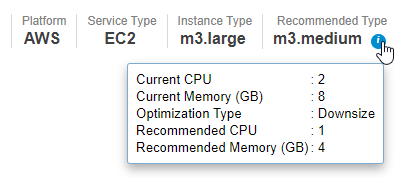
Details of the selected instance are displayed in the upper right corner of the page.

<Accordion title="Figure: Status Bar (hover over image to expand)">
  <Frame>
    <img src="https://mintcdn.com/densify-sync-changelog-3/Hjtc4f8VVVcXT_vY/images/docs/WebHelp_Densify_Cloud/Content/Resources/Images/Cirba_SaaS/06000124.png?fit=max&auto=format&n=Hjtc4f8VVVcXT_vY&q=85&s=72e099df186c72561e1c2671b9308abe" alt="" width="397" height="178" data-path="images/docs/WebHelp_Densify_Cloud/Content/Resources/Images/Cirba_SaaS/06000124.png" />
  </Frame>
</Accordion>

Clicking on the icon <InlineImage src="/images/docs/WebHelp_Densify_Cloud/Content/Resources/Images/Cirba_SaaS/06000059.png" /> on the Recommended Type displays the details of the recommended instance type.

### Footnote

The following additional details of the selected instance are displayed as a footnote, at the bottom of the page.

<table>
  <col />

  <col />

  <col />

  <col />

  <tbody>
    <tr>
      <td>
        <ul class="ul_1">
          <li class="CiRBAListBullet">Region</li>
        </ul>
      </td>

      <td>
        <ul class="ul_1">
          <li class="CiRBAListBullet">Availability Zone</li>
        </ul>
      </td>

      <td>
        <ul class="ul_1">
          <li class="CiRBAListBullet">Account | Subscription</li>
        </ul>
      </td>

      <td>
        <ul class="ul_1">
          <li class="CiRBAListBullet">System ID</li>
        </ul>
      </td>
    </tr>
  </tbody>
</table>

### Catalog Map Legend

The score shown in each cell in the catalog map is based on the current utilization and Densify's analyses results. These calculations account for both compatibility of the workload with an instance type's features and its monthly cost.

All instances that have been evaluated are displayed with their score displayed in colour-coded squares:

<Accordion title="Table: Catalog Map Legend">
  <table class="table_1">
    <col />

    <col />

    <col />

    <thead>
      <tr>
        <th class="td_2">
          <p class="CiRBATableColumnText">Value</p>
        </th>

        <th class="td_2">
          <p class="CiRBATableColumnText">Score Range </p>
        </th>

        <th class="td_2">
          <p class="CiRBATableColumnText">Description</p>
        </th>
      </tr>
    </thead>

    <tbody>
      <tr>
        <td class="td_3">
          <p class="CiRBATableText">Meets All Policies</p>
        </td>

        <td class="td_3" rowspan="2">
          <p class="CiRBATableText">Score ≥ 50 and Cost ≤ the selected Spend Tolerance.</p>
        </td>

        <td class="td_3" rowspan="2">
          <p class="CiRBATableText">The best option, with the highest  score is shown in green and other good options are shown in lighter shades of green.</p>
          <p class="CiRBATableText">Cost is the on-demand price \* <a href="./Understanding_the_Instance_Details_Report#Uptime%25">Uptime %</a></p>
        </td>
      </tr>

      <tr>
        <td class="td_3">
          <p class="CiRBATableText">Best Instance Type</p>
        </td>
      </tr>

      <tr>
        <td class="td_3">
          <p class="CiRBATableText">Outside Spend Tolerance</p>
        </td>

        <td class="td_3">
          <p class="CiRBATableText">Score ≥ 50 and Cost > the selected Spend Tolerance.</p>
        </td>

        <td class="td_3">
          <p class="CiRBATableText">These instances meet the technology and resource requirements of your workload, but their Cost exceeds the defined spend tolerance.</p>
          <p class="CiRBATableText">Cost is the on-demand price \* <a href="./Understanding_the_Instance_Details_Report#Uptime%25">Uptime %</a></p>
        </td>
      </tr>

      <tr>
        <td class="td_3">
          <p class="CiRBATableText">Technically Incompatible</p>
        </td>

        <td class="td_3">
          <p class="CiRBATableText">Score > 0 and \< 50</p>
        </td>

        <td class="td_3">
          <p class="CiRBATableText">These instances do not meet the technology requirements of the selected workload.</p>
        </td>
      </tr>

      <tr>
        <td class="td_3">
          <p class="CiRBATableText">Insufficient Resources</p>
        </td>

        <td class="td_3">
          <p class="CiRBATableText">Score = 0</p>
        </td>

        <td class="td_3">
          <p class="CiRBATableText">These instances do not meet the resource requirements of the selected workload.</p>
        </td>
      </tr>

      <tr>
        <td class="td_3">
          <p class="CiRBATableText">Not Available in <span class="CiRBAcharAttributeValue">\<region></span></p>
        </td>

        <td class="td_3">
          <p class="CiRBATableText">N/A</p>
        </td>

        <td class="td_3">
          <p class="CiRBATableText">These instance types do not exist in the selected region. The score is not displayed for these instance types.</p>
        </td>
      </tr>

      <tr>
        <td class="td_3">
          <p class="CiRBATableText">Instance Does Not Exist.</p>
        </td>

        <td class="td_3">
          <p class="CiRBATableText">N/A</p>
        </td>

        <td class="td_3">
          <p class="CiRBATableText">These instance types do not exist in the catalog. The score is not displayed for these instance types.</p>
        </td>
      </tr>

      <tr>
        <td class="td_3">
          <p class="CiRBATableText">Highlighted Instance Features</p>
        </td>

        <td class="td_3">
          <p class="CiRBATableText">N/A</p>
        </td>

        <td class="td_3">
          <p class="CiRBATableText">These instance types possess the specific feature selected from the Highlighted Instance Features dropdown control.</p>
        </td>
      </tr>

      <tr>
        <th class="td_2">
          <p class="CiRBATableColumnText">Value</p>
        </th>

        <th class="td_2">
          <p class="CiRBATableColumnText">Image</p>
        </th>

        <th class="td_2">
          <p class="CiRBATableColumnText">Description</p>
        </th>
      </tr>

      <tr>
        <td class="td_3">
          <p class="CiRBATableText">Show All Score Results</p>
        </td>

        <td class="td_3">
          <p class="CiRBATableText">
            <Frame>
              <img src="https://mintcdn.com/densify-sync-changelog-3/Hjtc4f8VVVcXT_vY/images/docs/WebHelp_Densify_Cloud/Content/Resources/Images/Cirba_SaaS/06000197.png?fit=max&auto=format&n=Hjtc4f8VVVcXT_vY&q=85&s=19d9552d256dc780e9747778136bf8f6" width="30" height="18" data-path="images/docs/WebHelp_Densify_Cloud/Content/Resources/Images/Cirba_SaaS/06000197.png" />
            </Frame>
          </p>
        </td>

        <td class="td_3">
          <p class="CiRBATableText">Use this control to show/hide the score value. If disabled, you will only see the values for the compatible instance types.</p>
        </td>
      </tr>

      <tr>
        <td class="td_3">
          <p class="CiRBATableText">Understanding Score Results</p>
        </td>

        <td class="td_3">
          <p class="CiRBATableText" />
        </td>

        <td class="td_3">
          <p class="CiRBATableText">Use this link to open the related topic in the online help.</p>
        </td>
      </tr>
    </tbody>
  </table>
</Accordion>

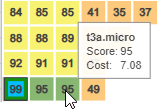
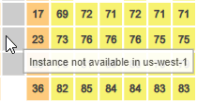
You can hover over any square in the chart to see the following information:

<table>
  <col />

  <col />

  <col />

  <tbody>
    <tr>
      <td>
        <ul class="ul_1">
          <li class="CiRBAListBullet">Instance Type</li>
          <li class="CiRBAListBullet"> Score</li>
          <li class="CiRBAListBullet">On-Demand Cost \* <a href="./Understanding_the_Instance_Details_Report#Uptime%25">Uptime %</a></li>
          <li class="CiRBAListBullet">Instance Availability</li>
        </ul>
      </td>

      <td>
        <p class="CiRBATableText">
          <Frame>
            <img src="https://mintcdn.com/densify-sync-changelog-3/Hjtc4f8VVVcXT_vY/images/docs/WebHelp_Densify_Cloud/Content/Resources/Images/Cirba_SaaS/06000198.png?fit=max&auto=format&n=Hjtc4f8VVVcXT_vY&q=85&s=4adc8e9d04a7b58911b4c67e5fc55676" width="159" height="110" data-path="images/docs/WebHelp_Densify_Cloud/Content/Resources/Images/Cirba_SaaS/06000198.png" />
          </Frame>
        </p>
      </td>

      <td>
        <p class="CiRBATableText">
          <Frame>
            <img src="https://mintcdn.com/densify-sync-changelog-3/Hjtc4f8VVVcXT_vY/images/docs/WebHelp_Densify_Cloud/Content/Resources/Images/Cirba_SaaS/06000145_197x104.png?fit=max&auto=format&n=Hjtc4f8VVVcXT_vY&q=85&s=52fc36bd520a4b9a75ed828e3465f2d5" width="197" height="104" data-path="images/docs/WebHelp_Densify_Cloud/Content/Resources/Images/Cirba_SaaS/06000145_197x104.png" />
          </Frame>
        </p>
      </td>
    </tr>
  </tbody>
</table>

### Summary Table

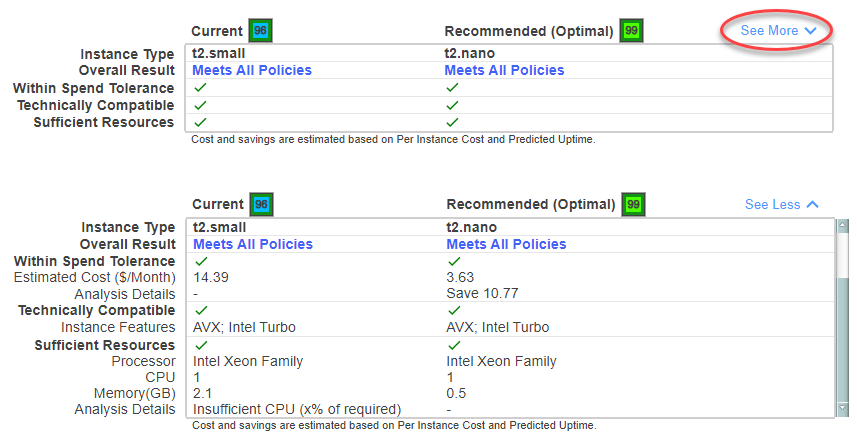
A summary table showing details of the current and recommended (optimal) instance type is displayed below the catalog map.

Click the "See More" link to see additional details for both instances.

<Accordion title="Figure: Catalog Map Summary Table - View Details">
  <Frame>
    <img src="https://mintcdn.com/densify-sync-changelog-3/Hjtc4f8VVVcXT_vY/images/docs/WebHelp_Densify_Cloud/Content/Resources/Images/Cirba_SaaS/06000200.png?fit=max&auto=format&n=Hjtc4f8VVVcXT_vY&q=85&s=64f20aee59477641243461f5fa254fd6" alt="" width="857" height="447" data-path="images/docs/WebHelp_Densify_Cloud/Content/Resources/Images/Cirba_SaaS/06000200.png" />
  </Frame>
</Accordion>

You can select a third instance in the map to view its details and compare it to the current and recommended instance types. Press Esc on your keyboard, or click the same tile again to cancel the selection or click on another tile to compare another instance type.

<Accordion title="Figure: Catalog Map Summary Table - Third Column">
  <Frame>
    <img src="https://mintcdn.com/densify-sync-changelog-3/Hjtc4f8VVVcXT_vY/images/docs/WebHelp_Densify_Cloud/Content/Resources/Images/Cirba_SaaS/06000199.png?fit=max&auto=format&n=Hjtc4f8VVVcXT_vY&q=85&s=dee6df4d1d0022a1db2b0635c0997fda" alt="" width="886" height="153" data-path="images/docs/WebHelp_Densify_Cloud/Content/Resources/Images/Cirba_SaaS/06000199.png" />
  </Frame>
</Accordion>

Click the See More link to see additional details for all of the selected instances.

<Accordion title="Table: Summary Table Header Icons">
  <table class="table_1">
    <col />

    <col />

    <col />

    <tbody>
      <tr>
        <th class="td_2">
          <p class="CiRBATableColumnText">Value</p>
        </th>

        <th class="td_2">
          <p class="CiRBATableColumnText">Example</p>
        </th>

        <th class="td_2">
          <p class="CiRBATableColumnText">Description</p>
        </th>
      </tr>

      <tr>
        <td class="td_3">
          <p class="CiRBATableText">Current</p>
        </td>

        <td class="td_3">
          <p class="CiRBATableText">
            <Frame>
              <img src="https://mintcdn.com/densify-sync-changelog-3/Hjtc4f8VVVcXT_vY/images/docs/WebHelp_Densify_Cloud/Content/Resources/Images/Cirba_SaaS/06000143.png?fit=max&auto=format&n=Hjtc4f8VVVcXT_vY&q=85&s=f914a43b826eb35d7d04ad5c06c52479" width="31" height="93" data-path="images/docs/WebHelp_Densify_Cloud/Content/Resources/Images/Cirba_SaaS/06000143.png" />
            </Frame>
          </p>
        </td>

        <td class="td_3">
          <p class="CiRBATableText">This is the score of the workload analyzed on the current instance type. The outline of the tile is also colour-coded, corresponding to the analysis result:</p>

          <ul class="ul_1">
            <li class="CiRBATableBullet">Red—Insufficient Resources</li>
            <li class="CiRBATableBullet">Yellow—Outside Spend Tolerance</li>
            <li class="CiRBATableBullet">Green—Meets all policies</li>
          </ul>
        </td>
      </tr>

      <tr>
        <td class="td_3">
          <p class="CiRBATableText">Recommended (Optimal)</p>
        </td>

        <td class="td_3">
          <p class="CiRBATableText">
            <Frame>
              <img src="https://mintcdn.com/densify-sync-changelog-3/Hjtc4f8VVVcXT_vY/images/docs/WebHelp_Densify_Cloud/Content/Resources/Images/Cirba_SaaS/06000142.png?fit=max&auto=format&n=Hjtc4f8VVVcXT_vY&q=85&s=42f208669499df07e1355d2d1289d2ad" width="29" height="31" data-path="images/docs/WebHelp_Densify_Cloud/Content/Resources/Images/Cirba_SaaS/06000142.png" />
            </Frame>
          </p>
        </td>

        <td class="td_3">
          <p class="CiRBATableText">The optimal instance type, with the highest score, within the spend tolerance.</p>
        </td>
      </tr>

      <tr>
        <td class="td_3">
          <p class="CiRBATableText">Terminate </p>
        </td>

        <td class="td_3">
          <p class="CiRBATableText">
            <Frame>
              <img src="https://mintcdn.com/densify-sync-changelog-3/Hjtc4f8VVVcXT_vY/images/docs/WebHelp_Densify_Cloud/Content/Resources/Images/Cirba_SaaS/06000146.png?fit=max&auto=format&n=Hjtc4f8VVVcXT_vY&q=85&s=67886cb8596604660a9acda77f234527" width="26" height="28" data-path="images/docs/WebHelp_Densify_Cloud/Content/Resources/Images/Cirba_SaaS/06000146.png" />
            </Frame>
          </p>
        </td>

        <td class="td_3">
          <p class="CiRBATableText"> A blue square with no score, indicates that <span class="mc-variable General.ProductName variable">Densify</span> recommends terminating the instance. </p>
          <p class="CiRBATableText">The catalog map displays a yellow square for instance types that cannot support the selected workload; however, the scores are not shown and there are no optimal instance types shown in thesummary chart.</p>
          <p class="CiRBATableText">A footnote below the summary table indicates that for terminate recommendation, all instance types are outside the spend tolerance.</p>
        </td>
      </tr>
    </tbody>
  </table>
</Accordion>

The following details are provided for both current and recommended instance types. The indented columns are only displayed with you expand the table by clicking on the See More link.

<Accordion title="Table: Catalog Map Summary Table Descriptions">
  <table class="table_1">
    <col />

    <col />

    <thead>
      <tr>
        <th class="td_2">
          <p class="CiRBATableColumnText">Section</p>
        </th>

        <th class="td_2">
          <p class="CiRBATableColumnText">Description</p>
        </th>
      </tr>
    </thead>

    <tbody>
      <tr>
        <td class="td_3">
          <p class="CiRBATableText"><span class="CiRBAcharUIElement">Instance Type</span></p>
        </td>

        <td class="td_3">
          <p class="CiRBATableText">The instance type name of current and optimal, recommendation.</p>
        </td>
      </tr>

      <tr>
        <td class="td_3">
          <p class="CiRBATableText"><span class="CiRBAcharUIElement">Overall Result</span></p>
        </td>

        <td class="td_3">
          <p class="CiRBATableText">A high-level summary of how <span class="mc-variable General.ProductName variable">Densify</span> determined the  score.</p>
        </td>
      </tr>

      <tr>
        <td class="td_3">
          <p class="CiRBATableText"><span class="CiRBAcharUIElement">Within Spend Tolerance</span></p>
        </td>

        <td class="td_3">
          <p class="CiRBATableText">Indicates whether or not the estimated cost for the instance type is within the specified spend tolerance.</p>
        </td>
      </tr>

      <tr>
        <td class="td_3">
          <p class="CiRBATableText">Estimated Cost (\$/Month)</p>
        </td>

        <td class="td_3">
          <p class="CiRBATableText">The monthly on-demand instance cost based on the catalog per instance cost and the predicted uptime. Potential savings are also based on per instance cost and the predicted uptime.</p>
          <p class="CiRBATableText">The monthly cost is calculated as On-Demand Cost \* Uptime %</p>
          <p class="CiRBATableText">A warning message is displayed if the current instance type exceeds the spend tolerance.</p>
        </td>
      </tr>

      <tr>
        <td class="td_3">
          <p class="CiRBATableText">Analysis Details</p>
        </td>

        <td class="td_3">
          <p class="CiRBATableText">Specific details from the analysis results.</p>
        </td>
      </tr>

      <tr>
        <td class="td_3">
          <p class="CiRBATableText"><span class="CiRBAcharUIElement">Technically Compatible</span></p>
        </td>

        <td class="td_3">
          <p class="CiRBATableText">Indicates whether or not the instance type meets the technical requirements of the workloads. </p>
        </td>
      </tr>

      <tr>
        <td class="td_3">
          <p class="CiRBATableText">Instance Features</p>
        </td>

        <td class="td_3">
          <p class="CiRBATableText">Lists specific features that contributed to the score and match your workload's characteristics.</p>
        </td>
      </tr>

      <tr>
        <td class="td_3">
          <p class="CiRBATableText"><span class="CiRBAcharUIElement">Sufficient Resources</span></p>
        </td>

        <td class="td_3">
          <p class="CiRBATableText">Indicates whether or not the instance has sufficient resources to run the workloads. </p>
        </td>
      </tr>

      <tr>
        <td class="td_3">
          <p class="CiRBATableText">Processor</p>
        </td>

        <td class="td_3">
          <p class="CiRBATableText">Specific details of the processor on which the instance type is based are listed.</p>
        </td>
      </tr>

      <tr>
        <td class="td_3">
          <p class="CiRBATableText">CPU</p>
        </td>

        <td class="td_3">
          <p class="CiRBATableText">The number of available vCPU/CPUs.</p>
        </td>
      </tr>

      <tr>
        <td class="td_3">
          <p class="CiRBATableText">Memory</p>
        </td>

        <td class="td_3">
          <p class="CiRBATableText">The amount of available memory in GB.</p>
        </td>
      </tr>

      <tr>
        <td class="td_3">
          <p class="CiRBATableText">Analysis Details</p>
        </td>

        <td class="td_3">
          <p class="CiRBATableText">Specific details from the analysis results.</p>
        </td>
      </tr>
    </tbody>
  </table>
</Accordion>

## Reviewing Instance Type Options

See the following video for an overview of how the score is determined and how to use the catalog map and the API to automate optimization of your AWS and Azure environments.

<Accordion title="Video: Selecting the Right Infrastructure">
  <iframe allowfullscreen="allowfullscreen" class="vidyard_iframe" frameborder="0" height="360" mozallowfullscreen="mozallowfullscreen" msallowfullscreen="msallowfullscreen" oallowfullscreen="oallowfullscreen" src="https://player.vimeo.com/video/899595044" webkitallowfullscreen="webkitallowfullscreen" width="630" />
</Accordion>

See [Systems: Analysis Details](/docs-api/WebHelp_Densify_API_Cloud/Content/API_Guide/Systems_Analysis_Details) for details of using the API endpoint to obtain catalog map details.